5 Things to Check in Squarespace Before Sending More Traffic to Your Website
Something that I am passionate about beyond creating modern, professional Squarespace websites is helping women-led businesses use their website as a tool that books clients on repeat. So no matter how many visitors are coming to your website, you can know that your website is set up to support your bigger business goals.
The reason that I love working with women entrepreneurs who are running a small local team or selling a service is because they are amazing at what they do, they are passionate about making real change, and they give back to their greater community.
Something that I am always amazed by is how fast my clients get things done. Most often, the women that I work with have a vision of what they want to create, and they want to make sure that it’s set up right from the start, because they don’t have time to waste.
I can relate to this because I am the same way. When I make up my mind to do something, I’m all in, and I want to do it right.
A question that I get a lot is, how do I send more traffic to my website?
I love this question because there are so many different opportunities to send more traffic to your website, whether you decide to blog, link to your website through Instagram posts or send people to your website from a podcast, presentation or workshop, the good news is that you can do it in a way that works for you.
I was recently talking to a past client, and she was asking for my advice on how she could improve her website traffic. She is running a local business and wanted to get in front of more people in her community. She had been blogging consistently for the past couple of months and invested in creating a professional and modern website for her business.
One of her main goals was to fill her spots with her website, for her, booking tours of her space is a big part of her intake process. She wanted to find out if since redoing her website, if people were coming to her website and to encourage them to book a tour with her before leaving.
Using Squarespace Analytics to See What’s Already Working
I always like to start by getting an idea of what is already working on your website before putting together a plan.
Squarespace is really good for giving you feedback on how your website is working for you and has Analytics built right into your Squarespace plan.
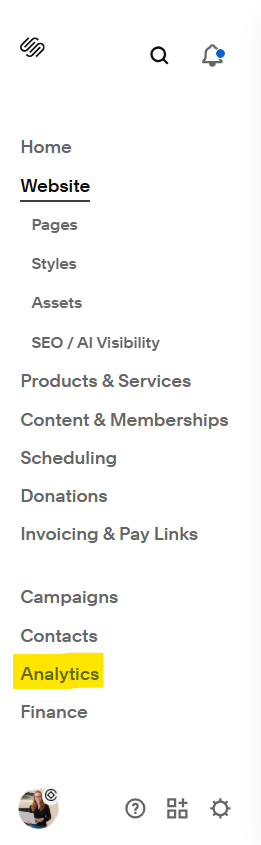
You can find it from the main navigation and select Analytics.
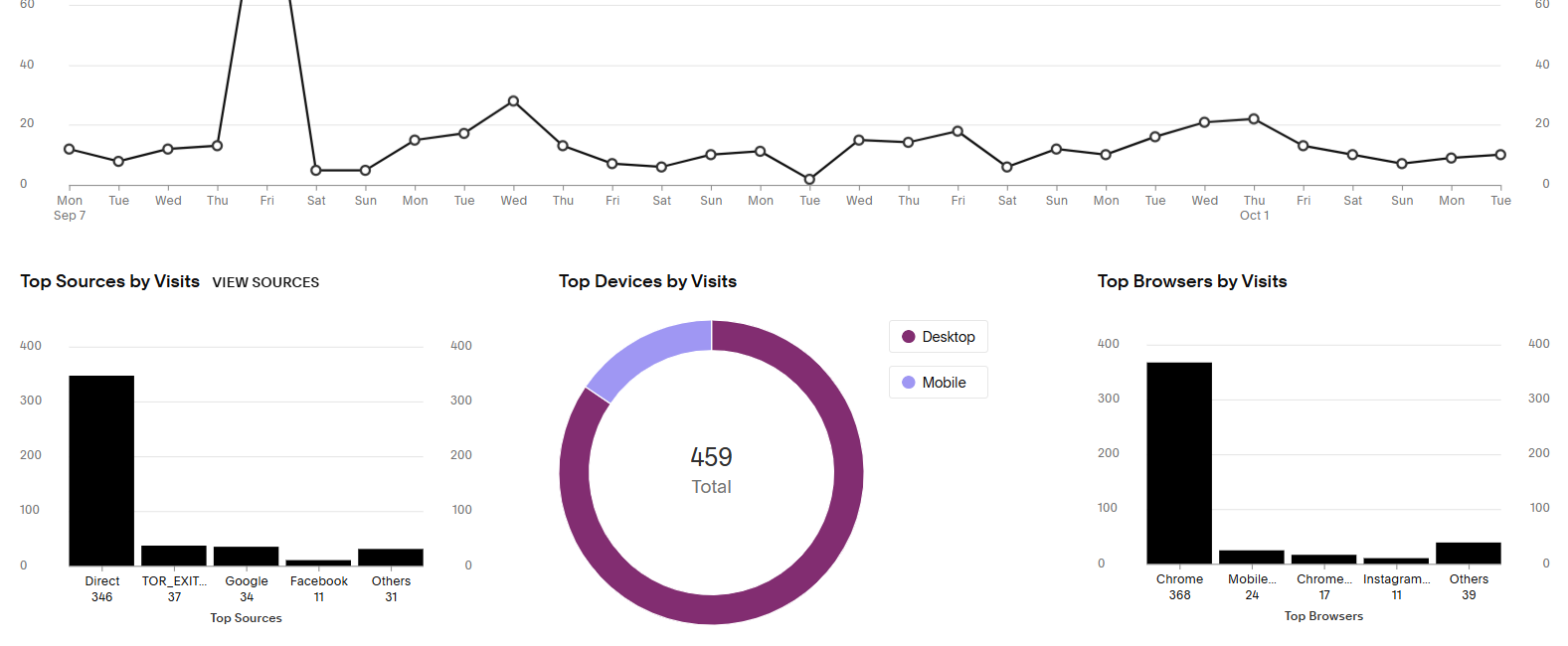
There, you can find a dashboard where you can learn more about how many visitors are coming to your website, what devices they are viewing your website from, the number of pageviews, and how people are finding your website.
The things that I want to pay attention to are:
Unique visitors
Pageviews
How people are visiting your website
The top three pages people are visiting and where they are dropping off
Conversions: whether that is a contact form, calls booked etc..
Key Website Metrics to Track Month to Month
At first glance, the analytics dashboard can be very overwhelming, but let’s go through this step-by-step to help you understand what to do next.
The most important numbers to keep track of are unique visitors and pageviews. These are the two that I would keep track of month to month to help you figure out if your website is growing over time.
Unique visitors are the number of new visitors coming to your website and is a more accurate picture of the number of visits you are getting.
Pageviews are how many people are visiting more than one page on your website. We ultimately want this number to be larger than the number of unique visitors coming to your website because that means people are exploring your website and following the path to book with you.
Once we know these numbers, we want to identify how people are finding your website. From the example above, the bar graph on the bottom left shows us that most visitors are coming directly, meaning they are typing the url into their search bar or they are clicking a link with the url. This could be from a social media story, a link you provided in a freebie, or a link you shared in your newsletter etc…
Understanding How Visitors Find and Navigate Your Site
The second thing to look at once you know how people are coming to your website is to look at the top pages that people are viewing. You can find this under Analytics> Engagement.
Most often, people will be viewing your home page the most, followed by either your about page or services page.
In the example below, my blog series Women Who Inspire Me is a major driver of traffic, followed by my services page.
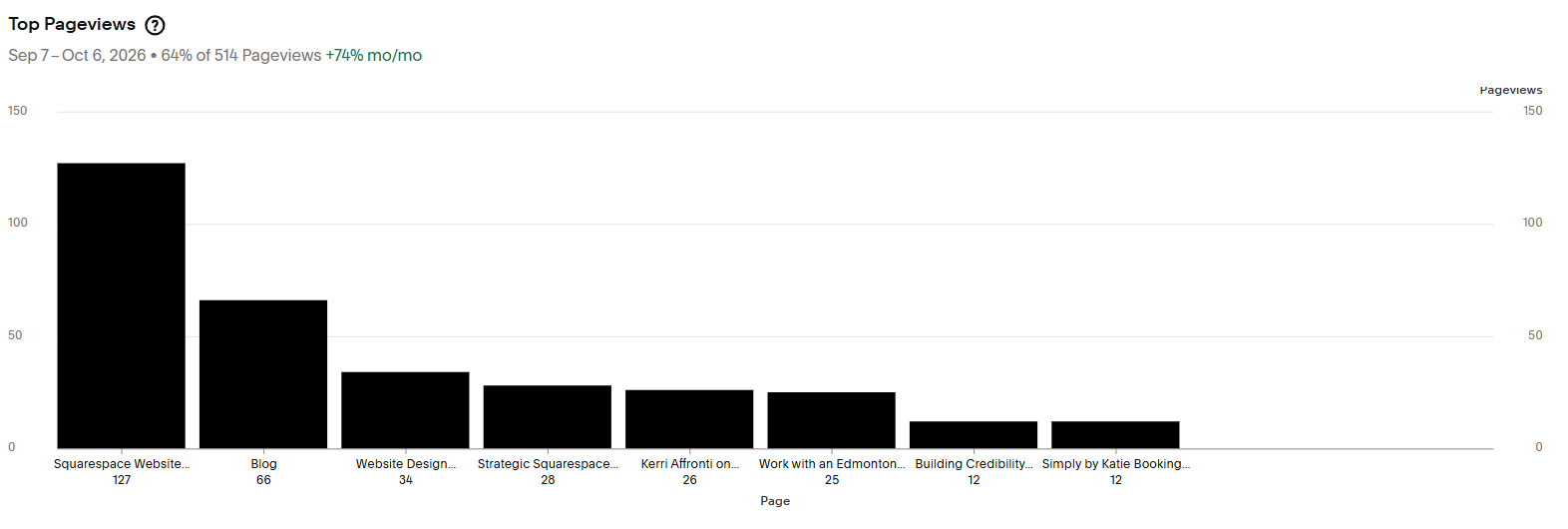
The last number to look at is your conversion rate. For this, we are looking at how many people submitted the form on your website, sent an email/called, or booked a call/tour/service with you.
Some of my clients prefer an email, some have a form on their website, and others link to an external booking platform like Jane.
Turning Analytics Data into Real-World Website Updates
How do we now use all this information to drive more traffic to your website and reach your business goals?
This is where it all gets exciting! Or at least I think so! What better way to grow your business than with data-backed numbers?
I’m going to give you a real-life example because I find that to be the most helpful way to see what's possible for your website.
For the past 9 months, my main goal was to build awareness for my blog series, Women Who Inspire Me. I can see from my Squarespace Analytics that it is paying off. People are coming directly to my website and reading my blog. They are now clicking off of my blog and learning more about my Squarespace Website packages, which is exactly what I want, yay!
So a couple of weeks ago, I decided that it was time to start booking up my calendar for the rest of 2026 and into 2027. Knowing this, I looked at the top pages that people have been visiting over the last 90 days, and I made some updates to my website to encourage visitors to fill out my booking form.
The things that I looked at were:
Clear Next Steps: Is there one path forward for people to work with me? Or do I have too many options available? Like a newsletter sign-up, invites to read my blog and the option to book a call with me?
Updated button language + CTAs: Does my homepage take people where I want them to go next? Knowing that when people are looking to work with a website designer, they want to learn more about the designer and see past work, I added sections to encourage people to learn more about me and my designs.
Mobile-ready: As I made all the changes, I made sure to check and update the mobile version of my website and to test all the links.
Now that your website is ready, it’s time to send more people your way.
Different options to get more traffic to your website include:
SEO optimization of your website
Blogging
Sharing the link in your weekly newsletter
Sharing your website on Instagram through posts, stories and people clicking on it from your link in bio
And when you’re ready for deeper support, I’d love to help you build a strategic, high-converting Squarespace website that feels like home for your brand. One that reflects your story and turns everyday visitors into booked clients.